The short version. If your AI presenter's voice changes from clip to clip, the text-to-speech is probably not the problem — the video model is. Seedance 2.5 re-sings your voiceover on every take, and picks the room acoustics from the shot size. Normalise loudness to one target, keep every talking beat at the same shot distance, and when the exact voice file has to survive, generate on Wan 3.0, which passed our audio through untouched.
We measured five things on four scenes of a tutorial with a generated presenter, and the text-to-speech turned out to be innocent.
One woman, one room, one voice, twelve minutes of material. Every clip looked good on its own. Cut them together and she fell apart: bright and close in one shot, muffled and distant in the next, as though she had wandered between a podcast booth and somebody's kitchen mid-sentence.
Why does an AI presenter sound different in every clip?
Stop guessing first. Re-rolling takes until they sound right is expensive and tells you nothing. So we measured the same five things on the text-to-speech source and on the finished audio, across four scenes: pitch, spectral brightness, integrated loudness, noise floor and speech level. One table told the whole story.
| Scene-to-scene spread | Text-to-speech source | Finished clip audio |
|---|---|---|
| Loudness | 0.5 LU | 9.4 LU |
| Speech level | 2.5 dB | 8.3 dB |
| Pitch (median F0) | 17.3 Hz | 9.5 Hz |
| Room tone (noise floor) | 10.6 dB | 4.8 dB |
Spread = loudest scene to quietest, highest pitch to lowest.
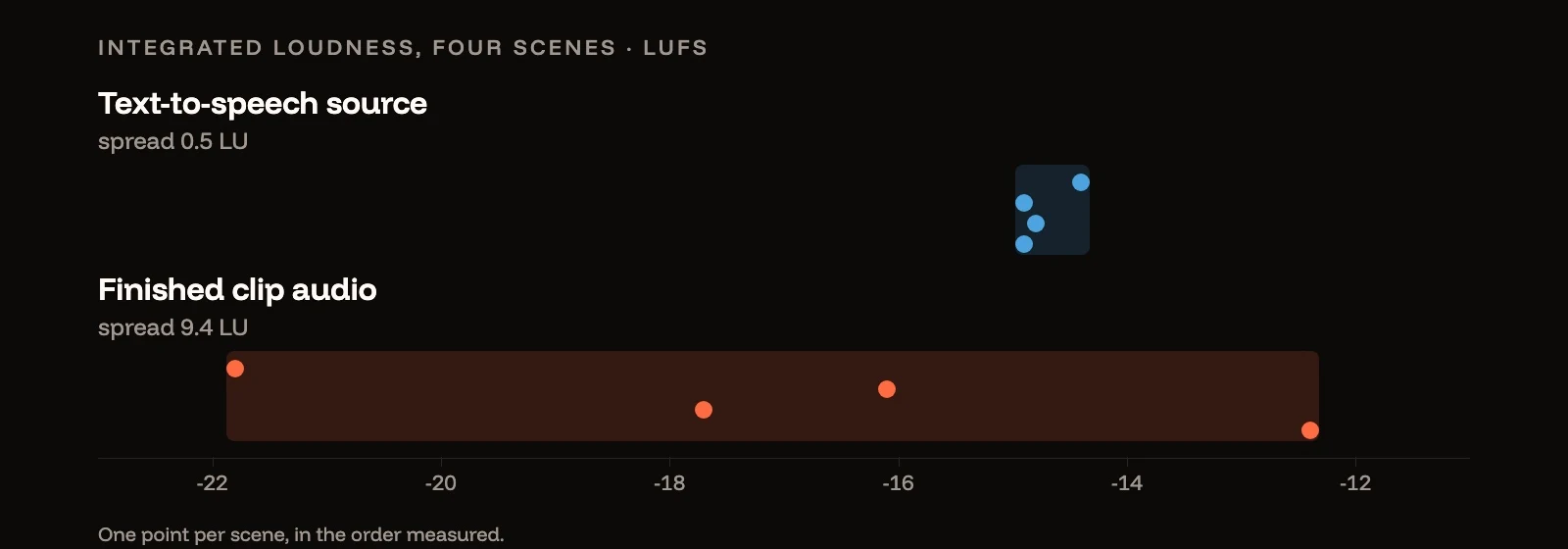
The text-to-speech was near-perfect: four scenes at −14.4, −14.9, −14.8 and −14.9 LUFS. The video model returned −21.8, −16.1, −17.7 and −12.4. That nine-and-a-half decibel swing is what "she sounds different every cut" actually is.
Note the two rows that go the other way. Pitch and room tone were more consistent after the video model than before it. The thing we assumed was drifting was not drifting at all.
Does the video model use your voiceover, or re-generate it?
Some models use it. Some sing it again. This was the finding that changed our pipeline. We cross-correlated the source audio against the audio embedded in each finished clip, then checked whether the alignment held.
| Model | Correlation with source | Drift across the clip |
|---|---|---|
| Seedance 2.5 | 0.30 – 0.55 | 120 – 440 ms |
| Wan 3.0 | 0.82 – 0.95 | 0 ms |
Wan 3.0 hands back your waveform, shifted by a fixed lag. Seedance 2.5 hands back a new performance: conditioned on your reference, recognisably the same character, but re-synthesised. Measured against the source, it pulled pitch down by 0.2 to 1.3 semitones and darkened the timbre by 5 to 19 per cent, differently on every take.
For a model that re-sings, two consequences follow, and both matter.
No prompt will fix it. The variation happens inside the model's audio synthesis, not in anything you can describe. We spent time writing careful instructions about consistent room tone before realising the room tone was already consistent.
You cannot swap the clean audio back in. It looks like the perfect fix — keep the good picture, drop your pristine voice track underneath — and on Seedance it fails, because the lips are following the model's own retimed performance, which has drifted up to 440 ms away from your file by the end of the clip.
Which model should you use for a talking presenter?
Decide what has to survive the generation.
- The exact voice file has to survive — a cloned brand voice, a script that must land word for word, a voiceover a client has already approved. Use Wan 3.0. Its output stays locked to your file at a fixed offset, so you can remove the lag and lay the original track back under the picture. Audio references are capped at 15 seconds in total per request, so plan talking beats in pieces of that length.
- The performance can move — the model's own read is acceptable, and you care more about the shot than the exact waveform. Seedance 2.5 is fine, and the rest of this post is how you keep its takes matching.
Either way, the voice itself starts in the text-to-speech generator; a consistent source is the one part that was never the problem.
Why does an AI host sound far away in wide shots?
The model matches the room to the shot. The podcast-booth-versus-kitchen feeling comes from the room, so we measured the direct-to-reverberant ratio — how dry and close a voice sounds versus how much room is around it — and the decay time after each phrase.
| Scene | Framing | Dryness | Room decay |
|---|---|---|---|
| Confession beat | Close | 2.8 | 116 ms |
| Introduction | Close | 3.1 | 81 ms |
| Opening | Wide | 1.3 | 139 ms |
| Closing | Wide | 0.3 | 209 ms |
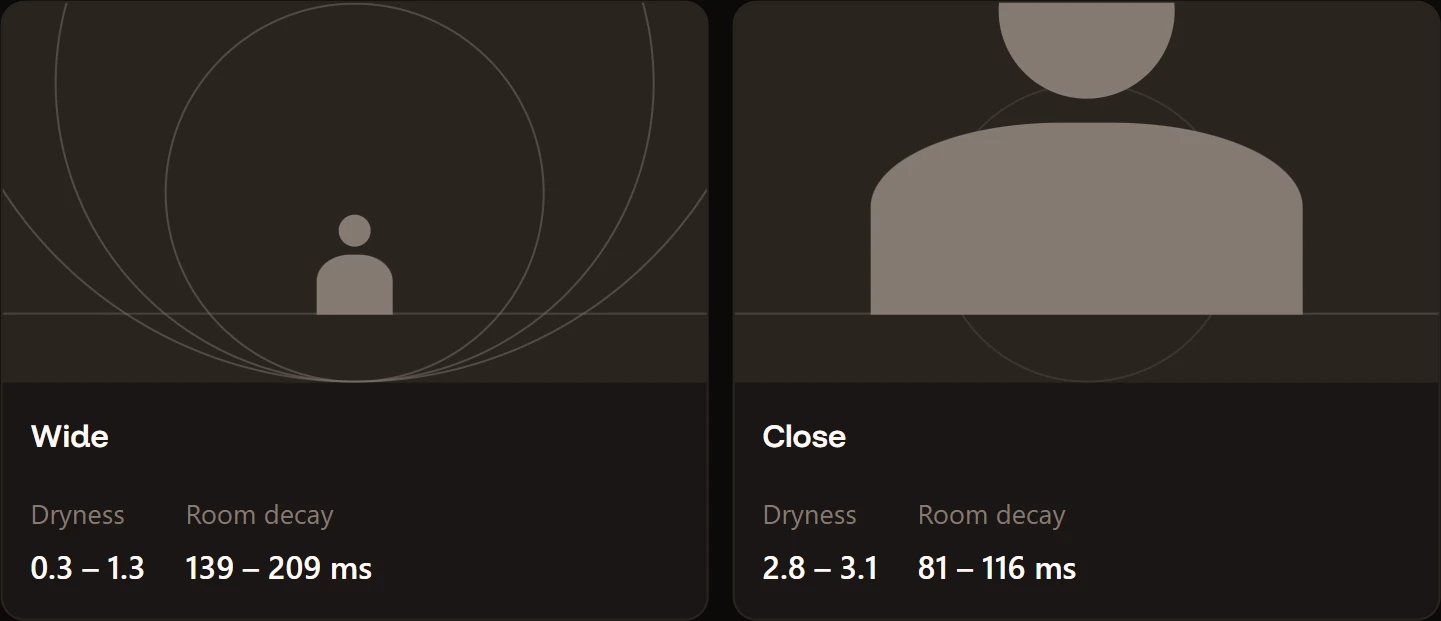
The wide shots are the roomy ones; both close shots are dry and intimate. The model infers the acoustics from the shot size — a person filmed from across a room should sound further away, so it puts them further away. That is good filmmaking instinct. It is also invisible until you cut a wide beat against a close one and your host appears to teleport.
Can you fix inconsistent AI video audio in post?
Two thirds of it. We built a matching chain and measured it honestly.
| Before | After | |
|---|---|---|
| Loudness spread | 9.4 LU | 0.4 LU |
| Timbre spread | 2.9 dB | 1.1 dB |
| Room spread | 2.3 dB | unchanged |
Two-pass loudness normalisation to a single target removes the loudness problem entirely. It costs nothing and you should be doing it regardless. Measure each clip, then correct it with the figures that measurement returned, using one target for every clip in the cut:
# pass 1: measure. Read the five measured_* values out of the JSON it prints.
ffmpeg -i clip.mp4 -af loudnorm=I=-14:TP=-1.5:LRA=11:print_format=json -f null -

# pass 2: correct, pasting pass 1's own numbers into the placeholders.
ffmpeg -i clip.mp4 -af loudnorm=I=-14:TP=-1.5:LRA=11:measured_I=<input_i>:measured_TP=<input_tp>:measured_LRA=<input_lra>:measured_thresh=<input_thresh>:offset=<target_offset>:linear=true -c:v copy out.mp4
A gentle per-clip shelf EQ brings the timbre most of the way into line.
Reverb is the one that does not yield. We added a small shared room to every clip so they would share one tail, and it made the spread worse, from 2.3 dB to 2.9 dB: a shared reverb adds to each clip's existing tail instead of replacing it. Matching reverb only works downwards, by removing it, and that needs a dedicated dereverb tool rather than a filter chain.
So the honest answer to "can I fix it in post" is: two thirds of it, yes, for free. The last third is cheaper to avoid than to repair.
How do you keep an AI presenter's voice consistent across clips?
Framing discipline, not audio. Keep every talking beat at the same shot distance and the room character stops changing, because the model stops being asked to change it.
We reached the same conclusion from a different direction. Running every clip through a video-understanding model as a quality gate, the close shots scored 7 out of 10 for lip-sync with zero offset; the wide shots scored 4 to 6 with 40 to 100 ms of offset. Its explanation: at a wide framing the face is small, so the mouth shapes read as mush.
Two independent measurements, one answer: shoot your generated presenter close, and keep her there. Use wide shots for movement, for the room, for anything where she is not speaking. If you need the acoustic steadier still, describe it rather than letting it be inferred. Every prompt now asks for a voice close and dry to the microphone, as if on a lapel mic a hand's width away, with no room echo.
close and dry to the microphone, as if on a lapel mic a hand's width away, with no room echo
How do you check AI lip-sync automatically?
Let a model grade it for you. Modern video-understanding models — any current multimodal model that accepts video — will watch a clip and grade the lip-sync, which turns a subjective argument into a checklist. Ours caught a bilabial consonant that never quite closed, a background mirror reflection that was not animating with the foreground, and an unrequested wink the model had added on its own. It also estimated the audio offset in milliseconds, which is exactly the number you need to choose between two routes. For how lip-sync models work in the first place, see AI lip sync technology explained.
One caveat: model choice matters more than you would expect. An older model rated every clip identically at 6 out of 10 and refused to estimate any offset — useless for ranking. A newer one separated them cleanly and gave the offsets. If your gate says everything is the same, suspect the gate.
When the gate flags one bad detail in an otherwise good take, edit the clip instead of re-rolling it.
The short version
- Measure before you re-roll. The spread across scenes names the stage at fault in one table.
- Your text-to-speech is probably innocent.
- Some video models pass your audio through; some re-sing it. Seedance 2.5 re-sings; Wan 3.0 passed ours through. That decides whether you can ever swap the clean track back in.
- Loudness normalisation is free and fixes the biggest problem.
- Reverb is not fixable by adding more reverb. We checked.
- Shoot talking beats close and keep the distance constant. It fixes the acoustics and the lip-sync at once.
Every number on this page was measured on our own takes, generated with Popcraft. The cover plots the loudness figures in the first table. Method: pitch via pYIN on voiced frames, loudness via the EBU R128 meter, dryness as the ratio of the first 50 ms of each speech onset to the following 150 ms, decay as the time to fall 20 dB after speech stops.